
API Reference
JavaScript Methods
new Cresc(options: CrescOptions)
Creates a Cresc OTA service instance, with the following constructor parameters:
Version health telemetry
Starting from v10.47.0, the SDK automatically reports a small set of lifecycle events to the update server at key points of the update flow. They power the per-version health view in the admin panel (download failure rate, patch failure rate, rollback rate, etc.), so you can spot a bad release right after publishing:
download_success/download_fail: the update package downloaded successfully / all download strategies failedpatch_fail: applying an incremental patch failed (including cases recovered by falling back to the full package), or switching versions failedrollback: the new version crashed on startup and was automatically rolled backmark_success: the new version started up and was marked successful
Each report only contains the update hash, the native package version, cInfo (SDK/RN/OS versions and the device identifier, same as in checkUpdate requests), and a truncated error summary on failures — never any business data. Reports are single fire-and-forget requests: no retries, failures are silently ignored, and they never affect the update flow or performance. Nothing is reported in development (__DEV__).
To opt out, disable it at initialization:
Note that with telemetry disabled, the admin panel cannot compute version health for these clients, nor warn you when a release is failing at scale.
JS error reporting
Since v10.55.0 the SDK reports JavaScript exceptions raised inside an OTA version to the update service, and the console restores the stack to your original source with the source map archived at publish time. Uncaught exceptions are reported automatically (the handler is appended on top of React Native's existing global ErrorUtils handler, so existing Sentry-style integrations are untouched), and you can report manually from a catch:
It is part of every plan at no extra cost. To opt out, set disableErrorReporting: true at initialization. The full story — console UI, source map requirements and manual reporting — is in JS Error Monitoring.
Native configuration and manual checks
Since v10.59.0, Android, iOS, and HarmonyOS hosts can call native configure before JavaScript starts, then prepareBundle after the normal launch bundle resolution. These APIs prepare updates without displaying dialogs or immediately reloading React Native. Rebuild and distribute the native application when upgrading; a JS-only OTA update cannot add native methods.
See Native Configuration and Updates for platform examples, result handling, and nativeConfigSource ownership rules. Cresc native configurations must explicitly provide Cresc endpoints; omitting endpoints selects the shared SDK's Pushy preset. The guide includes both Cresc service addresses and the matching discovery URL.
Native cold-start check
Since v10.52.1, the client runs an independent background update check from native code a few seconds after every cold start, with no JS involved. Its purpose is brick rescue: if a hot update kills your JS, the device can never run the JS-side check again — this native channel is the only one left that can pull the fix back down (activated via the console's force boot flag).
The behavior below assumes the default JavaScript-owned configuration (nativeConfigSource: "javascript"). With nativeConfigSource: "native", native configure controls checking through disabled and ordinary activation through afterDownload; JS strategy changes do not update these native settings.
Key behaviors:
- No immediate reload: native checking downloads and caches updates. With JavaScript-owned settings, silent strategies allow next-launch activation, while
checkStrategy: nullleaves ordinary activation to JS. Server force-boot and existing crash-rescue rules still apply - JS reuses its result: the JS-side check reuses the response the native check just fetched, saving one network round-trip on cold start
- Safety guards: the device-local rollback guard has top priority, and first-launch crash protection still rolls back automatically if the activated version fails to start
With JavaScript-owned configuration, disable native checking at init when required by your networking or consent policy:
With native-owned configuration, instead pass disabled: true with your complete Cresc native configuration. This disables both automatic and manual native checks; it does not disable JavaScript checks. Gate the initial native configuration/startup flow as needed rather than relying only on a JS hook for consent.
Disabling native checking removes this force-boot rescue route. A broken JS update may then require a native app upgrade or reinstall to recover.
beforeReload Example: Clean Up Native SDKs Before Reload
beforeReload runs before switchVersion() and restartApp() actually reload the app. Returning false cancels the reload; thrown errors or rejected promises also stop the reload. switchVersionLater() does not destroy the current RN instance immediately, so it does not trigger this hook.
If your app uses native SDKs that may keep profiling, sampling, logging, or upload work on background threads, clean them up here before Cresc reloads the RN instance:
useUpdate()
Utility functions for OTA updates. This method can also be imported using the alias useCresc.
Note that useUpdate cannot be called directly inside the component that uses <UpdateProvider> (typically the root component). It can only be called by its children.
Types and functionality:
async function checkUpdate()
Triggers an update check, returns updateInfo (Note: Before v10.26.0, checkUpdate had no return value. We still recommend prioritizing updateInfo from useUpdate()). There are three return scenarios:
{expired: true}: The native package has expired (3 cases: 1. Manually set as expired, 2. Manually deleted, 3. Never uploaded). You should prompt the user to download a new native build or redirect to the app store (requires settingdownloadUrlin the web console). To update an APK inside the app, configure the install permission and system confirmation flow.
-
{upToDate: true}: The app is currently up-to-date. -
{update: true}: A new version is available.nameanddescriptioncan be shown to the user.metaInfocan be used to set custom flags (like whether to update silently, or if it's a mandatory update). See Best Practices for details. It also contains download URLs.
async function downloadUpdate()
Downloads the hot update package. Only proceeds if update:true. Updates progress state. In v10.16.0+, returns boolean indicating success.
async function downloadAndInstallApk(url)
Downloads an APK and starts installation through Android's PackageInstaller. url must point directly to the APK file. This feature supports Android 5.0 (API 21) and later.
Installation must be initiated by the user and confirmed in Android's system installer. Regular apps cannot use this API for silent installation. The promise resolves after the system confirmation UI opens; it does not mean the user completed the installation.
Declare the install permission manually in the final app's AndroidManifest.xml:
The APK is downloaded into app-private storage and written directly to a PackageInstaller.Session, so no external storage permission is required.
On Android 8.0 (API 26) and later, the user must also allow the current app to install unknown apps. If this access has not been granted, the first call opens the app-specific system settings page and rejects with APK_INSTALL_PERMISSION_REQUIRED. Call the method again after the user grants access. Once the install session is submitted, the SDK handles STATUS_PENDING_USER_ACTION and opens Android's installation confirmation UI. The APK is not installed if the user declines.
REQUEST_INSTALL_PACKAGES is a sensitive permission. Do not include it in channel builds that do not need in-app APK installation. Google Play does not allow this permission to be used for self-updates; remove it from Google Play builds and direct users to the store or use Google Play's in-app update mechanism instead. Removing this permission only disables full APK installation and does not affect Cresc OTA updates.
function markSuccess()
Generally, do not call this manually. Marks the update as successfully applied (otherwise, the next boot expects a crash and rolls back).
currentVersionInfo
Information about the currently active hot update (empty object if no update was applied). Requires v10.31.2+.
currentVersionInfo is synchronous, and is recommended instead of getCurrentVersionInfo():
Example value:
function captureException(error, context?)
Reports a JavaScript exception manually. Requires v10.55.0+. context accepts fatal (whether the error is fatal, default false), componentStack (a React component stack) and extra (custom context: strings, numbers, booleans and null only, up to 32 fields).
The call returns synchronously and never throws: transport happens in the background, failures are silent, and the same error object is only reported once. Errors are only reported while running an OTA version, and never in development (__DEV__). See JS Error Monitoring.
async function getCurrentVersionInfo()
Gets information about the currently active hot update (returns an empty object if no update was applied). Use currentVersionInfo instead after v10.31.2.
Example return:
function restartApp()
Immediately restarts the application. Available in v10.28.2+.
If beforeReload is configured, Cresc waits for it before restarting. Returning false, throwing an error, or rejecting the promise cancels this restart.
async function resetToPackagedBundle(options?)
Resets the app to the bundle packaged in the binary. Returns a boolean indicating whether the reset succeeded. Available in v10.48.0+.
It wipes the whole OTA update state and deletes every downloaded version, so the next launch loads the bundle shipped inside the native package. Pass { restart: true } to restart immediately after a successful reset (the restart goes through restartApp, so beforeReload still applies). The device identifier (uuid) is preserved, so gray release bucketing is unaffected.
Useful as a "factory reset" for support instructions, remote kill switches, or recovery flows:
It can also be called directly on the client instance:
Like the other update-flow APIs, it never throws by default: failures resolve to false, and the error (code RESET_FAILED) is available via lastError / onError. With throwError: true configured, it throws instead.
Always check the return value. This method requires native module support (v10.48.0+): if a newer JS bundle was delivered via OTA onto an older binary, the call resolves to false — the app is then still running the OTA bundle, not the packaged one.
function switchVersion()
Immediately restarts the app and loads the newly downloaded version.
Warning! Do not rely solely on
progressto determine download completion! Call this strictly afterawait downloadUpdate()finishes.
If beforeReload is configured, Cresc passes { type: "switchVersion", hash } and waits for it before restarting. Returning false, throwing an error, or rejecting the promise cancels this restart.
function switchVersionLater()
Loads the newly downloaded version on the next natural app restart.
Warning! Call this strictly after
await downloadUpdate()finishes.
This method does not destroy the current RN instance immediately, so it does not trigger beforeReload.
function parseTestQrCode(qrCode: string)
Parses test QR codes, typically used by QA to test OTA packages. If your app already has a scanning feature, scan Cresc QRs to preview arbitrary update versions.
Note: If using custom update strategies, rely exclusively on updateInfo from useUpdate() because the QR code scan bypasses checkUpdate's return value.
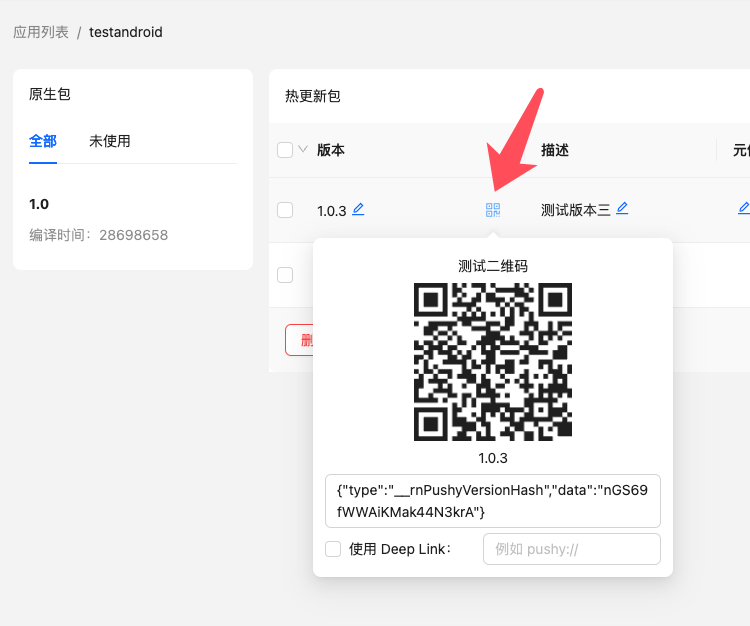
When using this method, do not check the "Use Deep Link" option.
Example:
Android Methods
UpdateContext.setCustomInstanceManager(ReactInstanceManager instanceManager)
If you are integrating into an existing Android host app and still create ReactInstanceManager manually, pass that instance here. Available since v5.5.8.
For New Architecture or @callstack/react-native-brownfield AAR integrations, prefer ReactHost with jsBundleFilePath, and expose getReactHost() from the host Application. See Brownfield Integration for the full setup.
Example: