First, you should have an application developed based on React Native. We refer to the directory containing package.json as your application's root directory.
If you haven't initialized an application yet, please see Getting Started with React Native.
We assume you already have everything set up for React Native development, including Node.js, Xcode, Android SDK, etc.
Installation
Run the following commands in your project's root directory (if you use other package managers like yarn, substitute accordingly):
# Install the CLI tool globally first
npm i -g react-native-update-cli

# Then install the hot update module inside the project directory
npm i react-native-update

# If not using Expo, navigate to the iOS folder and install pods
cd ios && pod install
# Install the CLI tool globally first
npm i -g react-native-update-cli

# Then install the hot update module inside the project directory
npm i react-native-update

# If using expo, requires Expo 50 or higher. Use prebuild command to prebuild the project
npx expo prebuild

# Then enter the iOS folder and install pods
cd ios && pod install
Warning
Note: If using Expo, please do NOT install expo-updates simultaneously, as it will cause update function conflicts. Also, New Architecture support in Expo versions under 51 is incomplete and might not work properly. It's recommended to use the latest version of Expo possible for New Architecture setups.
Warning
Please do not mix package managers like npm/yarn/pnpm and their associated lock files. Stick to one manager across your team and keep one format of the lock file.
Info
Remember, any modifications under the ios or android directories require recompilation (using npx react-native run-ios/android or compiling inside Xcode/Android Studio) to take effect.
Manual Link
If RN version >= 0.60, you don't need this manual linking step.
Warning
Note: If you have a brownfield native-RN project, or monorepo, or any custom scenario, the auto-linking function might fail because custom configurations might be incomplete or not fit the standard RN directory structure. Even if RN version >= 0.60, you might still need manual link operation.
iOS
RN < 0.60 and using CocoaPods (Recommended)
- Add to
ios/Podfile:
pod 'react-native-update', path: '../node_modules/react-native-update'
- Run
pod install in the ios directory.
- Recompile.
RN < 0.60 without CocoaPods
- In Xcode's Project Navigator, right click
Libraries ➜ Add Files to [Your Project Name]
- Go to
node_modules ➜ react-native-update ➜ ios and select RCTPushy.xcodeproj
- In Xcode's Project Navigator, select your project. Under
Build Phases ➜ Link Binary With Libraries, add libRCTPushy.a, libz.tbd, libbz2.1.0.tbd.
- Under
Build Settings, search for Header Search Path, add $(SRCROOT)/../node_modules/react-native-update/ios, and check recursive.
- Under
Build Phases, add a New Run Script Phase with the following content:
#!/bin/bash
set -x
DEST="../node_modules/react-native-update/ios/"
date +%s > "$DEST/pushy_build_time.txt"
- Attempt compilation. If successful, a
pushy_build_time.txt file is generated inside ../node_modules/react-native-update/ios/. Then, add the resulting pushy_build_time.txt into Copy Bundle Resources.
Android
RN < 0.60 or other scenarios preventing auto-link
-
Add the following to android/settings.gradle:
include ':react-native-update'
project(':react-native-update').projectDir = new File(rootProject.projectDir, '../node_modules/react-native-update/android')
-
Add this piece of code to the dependencies section inside android/app/build.gradle:
implementation project(':react-native-update')
-
Open android/app/src/main/java/[...]/MainApplication.java:
- Add
import cn.reactnative.modules.update.UpdatePackage; at the top of the file
- Add
new UpdatePackage() inside the getPackages() method (watch out for commas)
Configuring the Bundle URL
If you use expo 48+ and react-native-update >= 10.28.2, the bundle URL configures automatically. Skip straight to the next step.
If you don't use expo, or use an expo version under 48, manually follow the steps down below.
iOS
Add the following to your AppDelegate.mm / AppDelegate.m / AppDelegate.swift file (different RN versions have different file suffixes):
Warning
Note: If your project mixes native apps with RN, ensure you do not directly assign the bundleURL while initializing the rootView. Always initialize bridge using initWithDelegate, then initialize rootView via initWithBridge. Otherwise, the updating feature will likely break.
// ... Other code
#import "AppDelegate.h"

#import "RCTPushy.h"  // <-- Add this header import outside of any conditionals

// Sometimes there are conditionals for flipper
// #if DEBUG
// Do NOT place #import "RCTPushy.h" inside conditionals here
// #import <FlipperKit/FlipperClient.h>
// ...
// #endif


// For RN >= 0.74 update bundleURL
- (NSURL *)bundleURL
{
#if DEBUG
  // Leave DEBUG config as is
  return [[RCTBundleURLProvider sharedSettings] jsBundleURLForBundleRoot:@"index"];
#else
  return [RCTPushy bundleURL];  // <--  Replace the non-DEBUG section with our hot update bundle URL provider
#endif
}


// For RN < 0.74 update sourceURLForBridge
- (NSURL *)sourceURLForBridge:(RCTBridge *)bridge
{
#if DEBUG
  // Leave DEBUG config as is
  return [[RCTBundleURLProvider sharedSettings] jsBundleURLForBundleRoot:@"index"];
#else
  return [RCTPushy bundleURL];  // <--  Replace the non-DEBUG section with our hot update bundle URL provider
#endif
}
import UIKit
import React
import React_RCTAppDelegate
import ReactAppDependencyProvider
import react_native_update


@main
class AppDelegate: RCTAppDelegate {
  // ... Other code

  override func bundleURL() -> URL? {
#if DEBUG
    // Leave DEBUG config as is (meaning you cannot OTA test in DEBUG)
    RCTBundleURLProvider.sharedSettings().jsBundleURL(forBundleRoot: "index")
#else
    RCTPushy.bundleURL()  // <-- Replace the non-DEBUG section with our hot update bundle URL provider
#endif
  }
}
Android
Add the following piece of code inside MainApplication (if you package React Native as an AAR with @callstack/react-native-brownfield, or the host app does not use ReactApplication / ReactActivity, see Brownfield Integration):
// ... Other code

// ↓↓↓ Make sure to add this import
import cn.reactnative.modules.update.UpdateContext
// ↑↑↑

class MainApplication : Application(), ReactApplication {

  override val reactHost: ReactHost by lazy {
    getDefaultReactHost(
      context = applicationContext,
      packageList =
        PackageList(this).packages.apply {
          // Packages that cannot be auto-linked yet can be added manually here, for example:
          // add(MyReactNativePackage())
        },
      // ↓↓↓ Add this parameter
      jsBundleFilePath = UpdateContext.getBundleUrl(this),
      // ↑↑↑
    )
  }

  // ...Other code
}
// ... Other code

// ↓↓↓ Make sure to add this import
import cn.reactnative.modules.update.UpdateContext
// ↑↑↑

class MainApplication : Application(), ReactApplication {

  override val reactNativeHost: ReactNativeHost =
      object : DefaultReactNativeHost(this) {

        // ↓↓↓ Add this block entirely within DefaultReactNativeHost!
        override fun getJSBundleFile(): String? {
          return UpdateContext.getBundleUrl(this@MainApplication)
        }
        // ↑↑↑

        // ...Other code
      }
}
// ... Other code

// ↓↓↓ Make sure to add this import
import cn.reactnative.modules.update.UpdateContext;
// ↑↑↑

public class MainApplication extends Application implements ReactApplication {

  private final ReactNativeHost mReactNativeHost =
    // legacy RN versions might show new ReactNativeHost(this)
    new DefaultReactNativeHost(this) {

    // ↓↓↓ Add this block entirely within DefaultReactNativeHost!
    @Override
    protected String getJSBundleFile() {
        return UpdateContext.getBundleUrl(MainApplication.this);
    }
    // ↑↑↑

    // ...Other code
  }
}
Info
Remember, any modifications under the ios or android directories require recompilation (using npx react-native run-ios/android or compiling inside Xcode/Android Studio) to take effect.
Overriding Android's onCreate
If your app uses react-native-screens through react-navigation, Android can show a blank screen after an OTA-triggered restart unless RNScreensFragmentFactory is registered in MainActivity.
Do not set the fragment factory in MainActivityDelegate. Register it in MainActivity itself.
For background and edge-case notes, see the react-native-screens Android documentation.
// android/app/src/main/java/[...]/MainActivity.kt
import android.os.Bundle
import com.swmansion.rnscreens.fragment.restoration.RNScreensFragmentFactory

class MainActivity : ReactActivity() {
  // ...other codes

  override fun onCreate(savedInstanceState: Bundle?) {
    supportFragmentManager.fragmentFactory = RNScreensFragmentFactory()
    super.onCreate(savedInstanceState)
    // If your dependency versions do not provide RNScreensFragmentFactory,
    // fall back to:
    // super.onCreate(null)
  }
}
// android/app/src/main/java/[...]/MainActivity.java
import android.os.Bundle;
import com.swmansion.rnscreens.fragment.restoration.RNScreensFragmentFactory;

public class MainActivity extends ReactActivity {
  // ...other codes

  @Override
  protected void onCreate(Bundle savedInstanceState) {
    getSupportFragmentManager().setFragmentFactory(new RNScreensFragmentFactory());
    super.onCreate(savedInstanceState);
    // If your dependency versions do not provide RNScreensFragmentFactory,
    // fall back to:
    // super.onCreate(null);
  }
}
Adding A Deep Link For Testing
Deep links make OTA testing much easier because you can open a specific update payload directly from a QR code or test page.
In android/app/src/main/AndroidManifest.xml:
<manifest xmlns:android="http://schemas.android.com/apk/res/android">
  <application>

    <!-- Other parameters -->

    <!-- ↓↓↓ Make absolutely certain activity properties launchMode equal singleTask -->
    <activity
      android:launchMode="singleTask">
      <!-- ↑↑↑ -->

      <intent-filter>
        <action android:name="android.intent.action.MAIN" />
        <category android:name="android.intent.category.LAUNCHER" />
      </intent-filter>

      <!-- ↓↓↓ Include nested schemas underneath separating entirely separated intent properties entirely smoothly safely cleanly -->
      <intent-filter>
        <action android:name="android.intent.action.VIEW" />
        <category android:name="android.intent.category.DEFAULT" />
        <category android:name="android.intent.category.BROWSABLE" />
        <!-- Set distinct URI custom protocols resolving globally securely directly safely dynamically cleanly completely completely implicitly cleanly seamlessly dynamically appropriately safely globally reliably successfully explicitly flexibly automatically completely -->
        <data android:scheme="unique_custom_uri_protocol_do_not_conflict_with_others" />
      </intent-filter>
      <!-- ↑↑↑ -->

    </activity>
  </application>
</manifest>
After you finish compiling the app and uploading the release package, Cresc can generate a QR code for OTA testing.
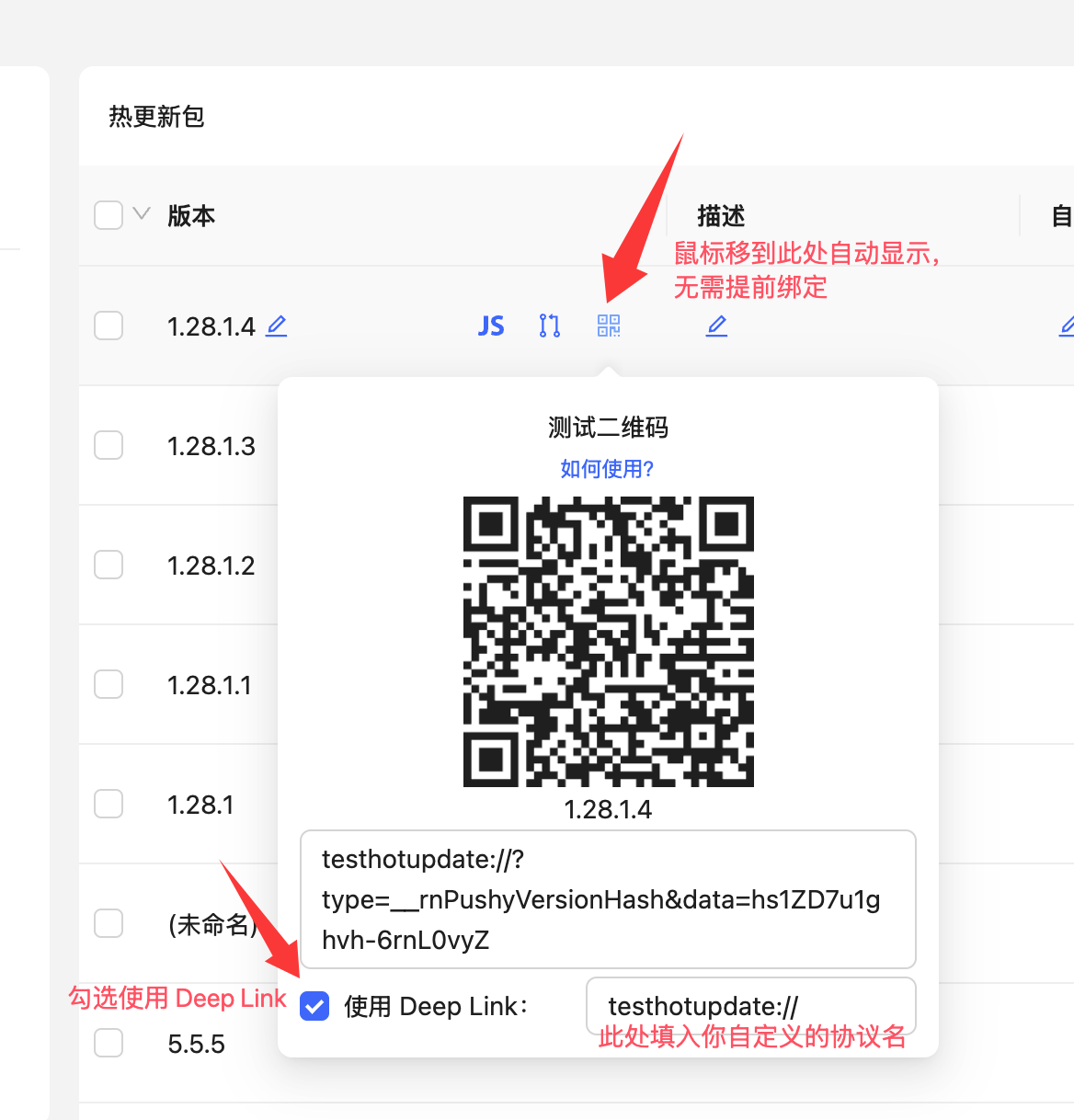
Enable the Use Deep Link option in the dashboard and enter the custom URL scheme you configured for the app.
If the release has just been uploaded, give the backend a short moment to prepare the test payload before scanning the QR code.
Info
If you implement a custom update UI, read the update state from useUpdate() instead of trying to parse the deep-link payload yourself.
Disabling Android Image Crunch Operations
Android can automatically reprocess PNG assets during release builds. That makes binary diffs less predictable and can unnecessarily increase package size. Disable crunchPngs in the release build type:
// In android/app/build.gradle

android {
    // ...
    signingConfigs {
      // ...
    }
    buildTypes {
        release {
            // ...
            crunchPngs false
        }
    }
}
Login & Creating Applications
Create an account and sign in at admin.cresc.dev, then use the CLI to authenticate locally:
The CLI stores working state in a local .update directory. Add .update to your .gitignore so temporary metadata does not enter source control.
Then create or select the app records that match your iOS and Android packages:
$ cresc createApp --platform ios
App Name: My App iOS
$ cresc createApp --platform android
App Name: My App Android
Info
Keep the names distinct if you manage iOS and Android separately.
If the app records already exist, select them locally instead:
$ cresc selectApp --platform ios
1) Nemo Fish (ios)
2) Catch Wealth (ios)

Total 2 ios apps
Enter appId: 1
This writes update.json into your project:
{
    "ios": {
        "appId": 1,
        "appKey": "<ios-app-key>"
    },
    "android": {
        "appId": 2,
        "appKey": "<android-app-key>"
    }
}
Commit update.json so the app can resolve the correct appKey during builds.
At this point you are ready for Code Integration.