API Reference
JavaScript Methods
new Cresc(options: CrescOptions)
Creates a Cresc OTA service instance, with the following constructor parameters:
interface CrescOptions {
  // Required, obtained via cresc createApp/selectApp command or the admin panel
  appKey: string;

  // Custom log output, can also be used to report analytics
  logger?: ({ type, data }: { type: EventType; data: EventData }) => void;

  // Strategy for automatically checking updates
  checkStrategy?:
    | "onAppStart" // Only when app starts
    | "onAppResume" // Only when app switches from background to foreground
    | "both"; // Default, includes both scenarios
    | null; // Do not check for updates automatically, must call checkUpdate manually. Requires v10.4.2+

  // Strategy for downloading and applying updates automatically
  updateStrategy?:
    | "alwaysAlert" // Default in __DEV__, uses system alert to prompt update and show errors
    | "alertUpdateAndIgnoreError" // Default in production, prompts update using system alert, but suppresses error alerts
    | "silentAndNow" // Automatically downloads silently and applies immediately
    | "silentAndLater"; // Automatically downloads silently, but applies only after the user restarts the app
    | null; // Do not download and apply automatically. Choose this if you need a custom UI.

  // Whether to automatically mark as successful after rebooting from an update, default: true
  // Manually marking is generally not recommended
  autoMarkSuccess?: boolean;

  // Whether to clear the last error after several ms, default: do not clear
  dismissErrorAfter?: number;

  // Whether to check for updates in the development environment, default: false. Enable this if you need to debug OTA in dev.
  // Even if enabled, it can only check and download updates, but cannot actually apply them. Applying updates requires a release build.
  // Requires v10.4.2+
  debug?: boolean;

  // Whether to throw an error when calling checkUpdate and downloadUpdate, default: false (get error info via lastError)
  // When enabled, you can use try/catch blocks. lastError will still be available.
  // try {
  //   await checkUpdate();
  // } catch (e) {
  //   console.error(e);
  // }
  // Requires v10.15.2+
  throwError?: boolean;

  // Executed before checking for updates, returning false cancels the check
  // Requires v10.12.0+
  beforeCheckUpdate?: () => Promise<boolean>;

  // Executed after each update check finishes, useful for reporting check results; does not affect the original check flow
  // Requires v10.38.3+
  afterCheckUpdate?: (state: UpdateCheckState) => Promise<void> | void;

  // Executed before downloading updates, returning false cancels the download. Can be used with custom metaInfo for flow control.
  // Requires v10.12.0+
  beforeDownloadUpdate?: (info: UpdateInfo) => Promise<boolean>;

  // Executed after downloading updates, returning false stops the built-in strategy.
  // Requires v10.27.0+
  afterDownloadUpdate?: (info: UpdateInfo) => Promise<boolean>;

  // Executed when the native package is expired, returning false stops the built-in strategy.
  // Requires v10.28.2+
  onPackageExpired?: (info: UpdateInfo) => Promise<boolean>;

  // Executed before switchVersion or restartApp performs an immediate reload; returning false cancels this reload.
  // Use it to wait for native SDKs such as Sentry to stop profiling and flush pending reports before the RN instance is destroyed.
  // Requires v10.42.2+
  beforeReload?: (
    context: BeforeReloadContext,
  ) => Promise<boolean | void> | boolean | void;

  // Whether to disable reporting update lifecycle events (version health stats), default: false (enabled)
  // See the "Version health telemetry" section below
  // Requires v10.47.0+
  disableTelemetry?: boolean;
}

// State reported after an update check finishes
type UpdateCheckState = {
  // completed: check finished; skipped: skipped due to debug/web environment, beforeCheckUpdate returning false, etc.; error: check failed
  status: "completed" | "skipped" | "error";
  // Check result when status is completed
  result?: UpdateInfo;
  // Error object when status is error
  error?: Error;
};

// Reload context passed to beforeReload
type BeforeReloadContext = {
  // switchVersion: immediately apply a downloaded OTA update; restartApp: restart the current app
  type: "switchVersion" | "restartApp";
  // Present for switchVersion and contains the OTA hash about to be applied
  hash?: string;
};

// Log event types
type EventType =
  // Update failed, rolled back after reboot
  | "rollback"
  // Error during check
  | "errorChecking"
  // Initiating check
  | "checking"
  // Downloading update
  | "downloading"
  // Download successful
  | "downloadSuccess"
  // Update failed
  | "errorUpdate"
  // Update success
  | "markSuccess"
  // Reset to the packaged bundle succeeded (resetToPackagedBundle). Requires v10.48.0+
  | "reset"
  // Reset to the packaged bundle failed. Requires v10.48.0+
  | "errorReset"
  // Downloading APK
  | "downloadingApk"
  // User rejected storage permission before downloading APK
  | "rejectStoragePermission"
  // Error requesting storage permission
  | "errorStoragePermission"
  // Error while downloading/installing APK
  | "errorDownloadAndInstallApk";

// Log event data
interface EventData {
  // Hash of the current completed update, empty string if no update applied
  currentVersion: string;
  // Client version info
  cInfo: {
    rnu: string; // react-native-update version
    rn: string; // react-native version
    os: string; // OS and version
    uuid: string; // User identifier
  };
  // Native package version
  packageVersion: string;
  // Build timestamp
  buildTime: number;
  // Error related info
  message?: string;
  // Hash of the rolled-back version
  rolledBackVersion?: string;
  // Hash of the failed new version
  newVersion?: string;
  // Additional data
  [key: string]: any;
}
Version health telemetry
Starting from v10.47.0, the SDK automatically reports a small set of lifecycle events to the update server at key points of the update flow. They power the per-version health view in the admin panel (download failure rate, patch failure rate, rollback rate, etc.), so you can spot a bad release right after publishing:
download_success / download_fail: the update package downloaded successfully / all download strategies failedpatch_fail: applying an incremental patch failed (including cases recovered by falling back to the full package), or switching versions failedrollback: the new version crashed on startup and was automatically rolled backmark_success: the new version started up and was marked successful
Each report only contains the update hash, the native package version, cInfo (SDK/RN/OS versions and the device identifier, same as in checkUpdate requests), and a truncated error summary on failures — never any business data. Reports are single fire-and-forget requests: no retries, failures are silently ignored, and they never affect the update flow or performance. Nothing is reported in development (__DEV__).
To opt out, disable it at initialization:
const crescClient = new Cresc({
  appKey,
  disableTelemetry: true,
});
Note that with telemetry disabled, the admin panel cannot compute version health for these clients, nor warn you when a release is failing at scale.
beforeReload Example: Clean Up Native SDKs Before Reload
beforeReload runs before switchVersion() and restartApp() actually reload the app. Returning false cancels the reload; thrown errors or rejected promises also stop the reload. switchVersionLater() does not destroy the current RN instance immediately, so it does not trigger this hook.
If your app uses native SDKs that may keep profiling, sampling, logging, or upload work on background threads, clean them up here before Cresc reloads the RN instance:
import { NativeModules } from "react-native";
import * as Sentry from "@sentry/react-native";
import { Cresc } from "react-native-update";

const crescClient = new Cresc({
  appKey,
  beforeReload: async (_context) => {
    try {
      NativeModules.RNSentry?.stopProfiling?.();
    } catch {}

    const flushed = await Promise.race([
      Sentry.flush(),
      new Promise<boolean>((resolve) => setTimeout(() => resolve(false), 1500)),
    ]);

    // Returning false cancels this immediate reload until the next check or manual trigger.
    return flushed;
  },
});
useUpdate()
Utility functions for OTA updates. This method can also be imported using the alias useCresc.
Info
Note that useUpdate cannot be called directly inside the component that uses <UpdateProvider> (typically the root component). It can only be called by its children.
const {
  checkUpdate,
  switchVersion,
  switchVersionLater,
  markSuccess,
  dismissError,
  downloadUpdate,
  downloadAndInstallApk,
  getCurrentVersionInfo,
  currentVersionInfo,
  parseTestQrCode,
  currentHash,
  packageVersion,
  client,
  progress,
  updateInfo,
  lastError,
  restartApp,
  resetToPackagedBundle,
} = useUpdate();
Types and functionality:
interface UpdateContext {
  // Checks for updates (Note: Before v10.26.0, `checkUpdate` had no return value, you had to get it from `updateInfo` returned by `useUpdate()`)
  // We still recommend getting `updateInfo` via `useUpdate()` primarily
  checkUpdate: () => Promise<void | UpdateInfo>;
  // Called after download completes to immediately restart and switch to the new version
  switchVersion: () => Promise<void>;
  // Called after download completes to switch to the new version on the next user-initiated restart (silent update)
  switchVersionLater: () => Promise<void>;
  // Manually mark update as successful after a restart
  markSuccess: () => void;
  // Clear the last error state
  dismissError: () => void;
  // Download the update. Returns `boolean` in v10.16.0+, indicating success.
  downloadUpdate: () => Promise<boolean | void>;
  // Download and install an APK
  downloadAndInstallApk: (url: string) => Promise<void>;
  // Asynchronously get info about the currently applied update. Use `currentVersionInfo` instead after v10.31.2.
  getCurrentVersionInfo: () => Promise<{
    name?: string;
    description?: string;
    metaInfo?: string;
  }>;
  // Info about the currently applied update. Requires v10.31.2+.
  currentVersionInfo: {
    name?: string;
    description?: string;
    metaInfo?: string;
  };
  // Parse test QR code. Requires v10.11.2+
  parseTestQrCode: (qrCode: string) => void;
  // Current version hash
  currentHash: string;
  // Current native package version
  packageVersion: string;
  // Current Cresc service instance
  client?: Cresc;
  // Immediately restart the app. Requires v10.28.2+.
  restartApp: () => Promise<void>;
  // Reset to the bundle packaged in the binary. Returns whether it succeeded. Requires v10.48.0+.
  resetToPackagedBundle: (options?: { restart?: boolean }) => Promise<boolean>;
  // Progress data after download starts
  progress?: {
    hash: string;
    // Bytes downloaded
    received: number;
    // Total bytes to download
    total: number;
  };
  // Update-related info
  updateInfo?: {
    // Already up-to-date
    upToDate?: true;
    // Native package expired, requires downloading a new native build
    expired?: true;
    // Native package download URL set in the admin console
    downloadUrl?: string;
    // Is there a new update?
    update?: true;
    // New update version name
    name?: string;
    // New update hash
    hash?: string;
    // Update description/changelog
    description?: string;
    // Extra metadata payload
    metaInfo?: string;
    // Is the update currently paused?
    paused?:
      | "app" // Paused for all native versions of the app
      | "package" // Paused for this native version only
      | "quota"; // Paused due to exceeding check quota
    // Other messages
    message?: string;
  };
  // The most recent error occurring during check, download, or apply
  lastError?: Error;
}
async function checkUpdate()
Triggers an update check, returns updateInfo (Note: Before v10.26.0, checkUpdate had no return value. We still recommend prioritizing updateInfo from useUpdate()). There are three return scenarios:
{expired: true}: The native package has expired (3 cases: 1. Manually set as expired, 2. Manually deleted, 3. Never uploaded). You should prompt the user to download a new native build or redirect to the app store (requires setting downloadUrl in the web console). To update an APK inside the app, configure install permissions.
{
    expired: true,
    downloadUrl: 'http://appstore/downloadUrl',
}
-
{upToDate: true}: The app is currently up-to-date.
-
{update: true}: A new version is available. name and description can be shown to the user. metaInfo can be used to set custom flags (like whether to update silently, or if it's a mandatory update). See Best Practices for details. It also contains download URLs.
{
    update: true,
    name: '1.0.3-rc',
    hash: 'hash',
    description: 'Added Chat feature\nFixed store bugs',
    metaInfo: '{"silent":true}',
    pdiffUrl: 'https://cdn.example.com/hash',
    diffUrl: 'https://cdn.example.com/hash',
}
async function downloadUpdate()
Downloads the hot update package. Only proceeds if update:true. Updates progress state. In v10.16.0+, returns boolean indicating success.
async function downloadAndInstallApk(url)
Downloads and directly installs an APK. url must point directly to the APK file.
Due to external factors like system security constraints, this is not guaranteed to succeed perfectly. If download/install fails during the app lifecycle, subsequent calls won't retry and fail silently.
Note: Requires manual permissions added to AndroidManifest.xml. If supporting pre-Android 7.0 devices, you also need external storage permissions.
<uses-permission android:name="android.permission.REQUEST_INSTALL_PACKAGES" />

<!-- For pre-Android 7.0 -->
<uses-permission android:name="android.permission.WRITE_EXTERNAL_STORAGE" />
Note that some app stores might reject your app due to these permissions. Removing them does not affect OTA update functionality.
function markSuccess()
Generally, do not call this manually. Marks the update as successfully applied (otherwise, the next boot expects a crash and rolls back).
currentVersionInfo
Information about the currently active hot update (empty object if no update was applied). Requires v10.31.2+.
currentVersionInfo is synchronous, and is recommended instead of getCurrentVersionInfo():
const { currentVersionInfo } = useUpdate();

console.log(currentVersionInfo.name);
Example value:
{
    name: '1.0.3-rc',
    description: 'Added Chat feature\nFixed store bugs',
    metaInfo: '{"silent":true}',
}
async function getCurrentVersionInfo()
Gets information about the currently active hot update (returns an empty object if no update was applied). Use currentVersionInfo instead after v10.31.2.
Example return:
{
    name: '1.0.3-rc',
    description: 'Added Chat feature\nFixed store bugs',
    metaInfo: '{"silent":true}',
}
function restartApp()
Immediately restarts the application. Available in v10.28.2+.
If beforeReload is configured, Cresc waits for it before restarting. Returning false, throwing an error, or rejecting the promise cancels this restart.
async function resetToPackagedBundle(options?)
Resets the app to the bundle packaged in the binary. Returns a boolean indicating whether the reset succeeded. Available in v10.48.0+.
It wipes the whole OTA update state and deletes every downloaded version, so the next launch loads the bundle shipped inside the native package. Pass { restart: true } to restart immediately after a successful reset (the restart goes through restartApp, so beforeReload still applies). The device identifier (uuid) is preserved, so gray release bucketing is unaffected.
Useful as a "factory reset" for support instructions, remote kill switches, or recovery flows:
const { resetToPackagedBundle } = useUpdate();

// Wipe all OTA updates and restart into the packaged bundle
const ok = await resetToPackagedBundle({ restart: true });
It can also be called directly on the client instance:
const ok = await crescClient.resetToPackagedBundle();
Like the other update-flow APIs, it never throws by default: failures resolve to false, and the error (code RESET_FAILED) is available via lastError / onError. With throwError: true configured, it throws instead.
Warning
Always check the return value. This method requires native module support (v10.48.0+): if a newer JS bundle was delivered via OTA onto an older binary, the call resolves to false — the app is then still running the OTA bundle, not the packaged one.
function switchVersion()
Immediately restarts the app and loads the newly downloaded version.
Warning! Do not rely solely on progress to determine download completion! Call this strictly after await downloadUpdate() finishes.
If beforeReload is configured, Cresc passes { type: "switchVersion", hash } and waits for it before restarting. Returning false, throwing an error, or rejecting the promise cancels this restart.
function switchVersionLater()
Loads the newly downloaded version on the next natural app restart.
Warning! Call this strictly after await downloadUpdate() finishes.
This method does not destroy the current RN instance immediately, so it does not trigger beforeReload.
function parseTestQrCode(qrCode: string)
Parses test QR codes, typically used by QA to test OTA packages. If your app already has a scanning feature, scan Cresc QRs to preview arbitrary update versions.
Note: If using custom update strategies, rely exclusively on updateInfo from useUpdate() because the QR code scan bypasses checkUpdate's return value.
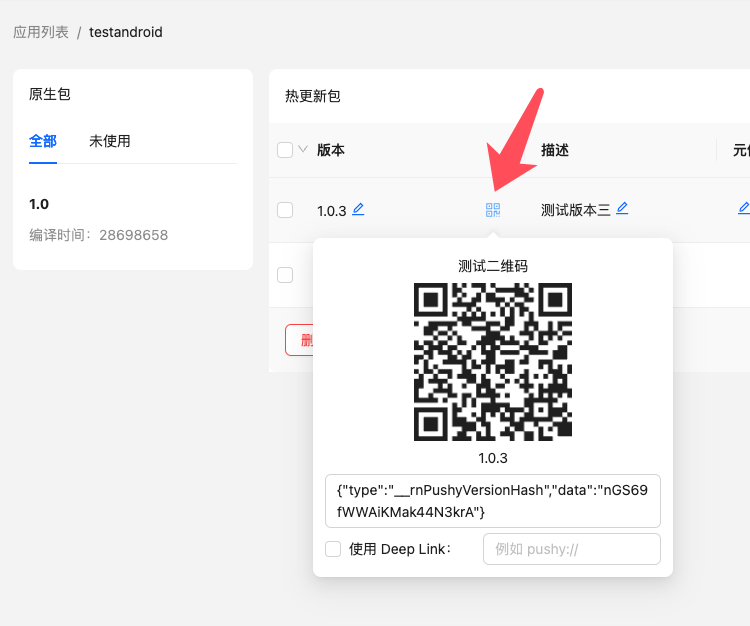
When using this method, do not check the "Use Deep Link" option.
Example:
<Camera
  onReadCode={({ nativeEvent: { codeStringValue } }) => {
    // Disable camera upon read
    setShowCamera(false);
    // Parse test QR first
    if (parseTestQrCode(codeStringValue)) {
      // If it's a Cresc QR, stop processing
      return;
    }
    // Otherwise, process normal business logic
  }}
/>
Android Methods
UpdateContext.setCustomInstanceManager(ReactInstanceManager instanceManager)
If you are integrating into an existing Android host app and still create ReactInstanceManager manually, pass that instance here. Available since v5.5.8.
Info
For New Architecture or @callstack/react-native-brownfield AAR integrations, prefer ReactHost with jsBundleFilePath, and expose getReactHost() from the host Application. See Brownfield Integration for the full setup.
Example:
import cn.reactnative.modules.update.UpdateContext

mReactInstanceManager = ReactInstanceManager.builder()
                // ...other setters, but do NOT call setBundleAssetName
                .setJSBundleFile(UpdateContext.getBundleUrl(mContext, "assets://index.android.bundle"))
                .build();
UpdateContext.setCustomInstanceManager(mReactInstanceManager);